Plugin:GTalkExt/en: Difference between revisions
Plugin:GTalkExt/en
+{{Tip}} |
Dart Raiden (talk | contribs) No edit summary |
||
| Line 1: | Line 1: | ||
{{PluginCard}} | {{PluginCard}} | ||
GTalk extensions for {{Plugin|Jabber|Jabber protocol}}. Currently only Gmail notifications implemented. | GTalk extensions for {{Plugin|Jabber|Jabber protocol}}. Currently only Gmail notifications implemented. | ||
Plugin is deprecated, because Google disable XMPP notifications. | |||
Revision as of 15:56, 25 August 2017
| GTalk Extension | |
|---|---|

| |
| Filename | GTalkExt.dll |
| Author | bems |
|
| |
GTalk extensions for Jabber protocol. Currently only Gmail notifications implemented.
Plugin is deprecated, because Google disable XMPP notifications.
FAQ
- Is there any way for GTalkExt to notify you of new mail in the contact list?
- If there is no tabs auto opening, it will blink in contact list (see Screen 1 for settings).
- How to change the sound for new mail notification?
- Sounds for new mail are not implemented. You can try and use XSoundNotify and give GTalkExt pseudocontact its own sound.
- How to get that GMail notifications section in the screenshot? I don't have it.
- Jabber account with gmail.com as server gets this extra tab with GTalkExt installed. Pay attention to specifying connection host and port (talk.google.com : 443).<translate> Tip</translate>
Selecting Google Talk! template in the drop-down list Type on creating account (Screen 2) fills in those settings automatically.
-
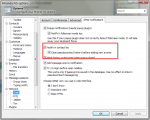 Screen 1 GTalkExt settings
-
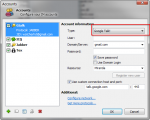 Screen 2 Creating GTalk account

