Using Process Explorer as the debugging tool/en: Difference between revisions
Using Process Explorer as the debugging tool/en
Updating to match new version of source page |
Updating to match new version of source page |
||
| (4 intermediate revisions by the same user not shown) | |||
| Line 1: | Line 1: | ||
<languages/> | <languages/> | ||
If Miranda NG freezes, hangs up or consumes CPU without a reason, you may investigate the case using Process Explorer tool. | If Miranda NG freezes, hangs up or consumes CPU without a reason, you may investigate the case using Process Explorer tool. | ||
All you need to do is the following: | All you need to do is the following: | ||
* Download [https://technet.microsoft.com/en-us/sysinternals/bb896653 Process Explorer] from Microsoft website. Run <tt>procexp.exe</tt> and accept license agreement by clicking ''Agree'' button. | * Download [https://technet.microsoft.com/en-us/sysinternals/bb896653 Process Explorer] from Microsoft website. Run <tt>procexp.exe</tt> and accept license agreement by clicking ''Agree'' button. | ||
* Download [[Special:MyLanguage/Download#Debug_symbols | Miranda NG debug symbols]] | * Download [[Special:MyLanguage/Download#Debug_symbols | Miranda NG debug symbols]] {{Strong|corresponding to your current Miranda version}}. Extract the symbols to any directory on your computer (Miranda main folder will do). | ||
* Point Process Explorer to the debug symbols using ''Options → Configure Symbols'' (Screen 1). | * Point Process Explorer to the debug symbols using ''Options → Configure Symbols'' (Screen 1). | ||
* In Process Explorer pick up Miranda process, right-click it and select ''Properties…'' (Screen 2). | * In Process Explorer pick up Miranda process, right-click it and select ''Properties…'' (Screen 2). | ||
| Line 17: | Line 17: | ||
== See also == | == See also == | ||
* | * {{Ll|Reporting bugs}} | ||
[[Category:Help]] | [[Category:Help{{#translation:}}|{{#getdisplaytitle:{{FULLPAGENAME}}}}]] | ||
Latest revision as of 19:48, 12 June 2018
If Miranda NG freezes, hangs up or consumes CPU without a reason, you may investigate the case using Process Explorer tool.
All you need to do is the following:
- Download Process Explorer from Microsoft website. Run procexp.exe and accept license agreement by clicking Agree button.
- Download Miranda NG debug symbols corresponding to your current Miranda version. Extract the symbols to any directory on your computer (Miranda main folder will do).
- Point Process Explorer to the debug symbols using Options → Configure Symbols (Screen 1).
- In Process Explorer pick up Miranda process, right-click it and select Properties… (Screen 2).
- On Threads tab in the window that will pop up select the main thread. Under Windows 7 its name looks like miranda32[64].exe!wWinMain (Screen 3).
- Clicking Stack button will open the window containing the information which you may copy and attach to your bug report.
-
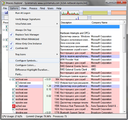 Screen 1: Point Process Explorer to debug symbols
 -
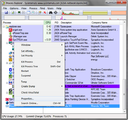 Screen 2: Select Properties… of Miranda process
 -
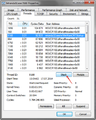 Screen 3: Select main thread and click Stack


