|
|
| Line 1: |
Line 1: |
| {{PluginCard}} | | {{PluginCard}} |
| Erweiterung des {{Plugin|Jabber|Jabber-Protokolls}} für Google Mail. Aktuell sind nur E-Mail-Benachrichtigungen implementiert. | | Erweiterung des {{Plugin|Jabber|Jabber-Protokolls}} für Google Mail. Aktuell sind nur E-Mail-Benachrichtigungen implementiert. |
| {{Untranslated}}
| |
| == FAQ ==
| |
| ; Is there any way for GTalkExt to notify you of new mail in the contact list?
| |
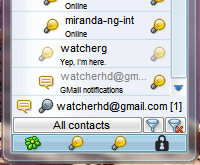
| : If there is no tabs auto opening, it will blink in contact list (see ''Screen 1'' for settings).
| |
| ; How to change the sound for new mail notification?
| |
| : Sounds for new mail are not implemented. You can try and use {{Plugin|XSoundNotify}} and give GTalkExt pseudocontact its own sound.
| |
| ; How to get that ''GMail notifications'' section in the screenshot? I don't have it.
| |
| : Jabber account with <tt>gmail.com</tt> as server gets this extra tab with GTalkExt installed. Pay attention to specifying connection host and port (<tt>talk.google.com : 443</tt>).{{Tip|Selecting ''Google Talk!'' template in the drop-down list ''Type'' on creating account (Screen 2) fills in those settings automatically.}}
| |
|
| |
|
| <gallery widths="200px">
| | Plugin wurde eingestellt, da Google keine XMPP-Benachrichtigungen mehr sendet. |
| File:GTalkExt - settings.png|''Screen 1'' GTalkExt settings
| | |
| File:Account manager - GTalk account.png|''Screen 2'' Creating GTalk account
| |
| </gallery>
| |
| {{PluginGroups}} | | {{PluginGroups}} |
Revision as of 15:04, 27 August 2017
| GTalk Extension
|
|
| Dateiname
|
GTalkExt.dll
|
| Autor
|
bems
|
|
|
Erweiterung des Jabber-Protokolls für Google Mail. Aktuell sind nur E-Mail-Benachrichtigungen implementiert.
Plugin wurde eingestellt, da Google keine XMPP-Benachrichtigungen mehr sendet.
