Plugin:GTalkExt/be: Difference between revisions
Plugin:GTalkExt/be
Updating to match new version of source page |
Updating to match new version of source page |
||
| (One intermediate revision by one other user not shown) | |||
| Line 1: | Line 1: | ||
<languages/>{{PluginCard}} | <languages/>{{PluginCard}} | ||
{{TNT|Message/Deprecated plugin|Google disabled XMPP notifications.}} | {{TNT|Message/Deprecated plugin|Google disabled XMPP notifications.}} | ||
Пашырэнне пратаколу {{Plugin|Jabber}} для паштовых апавяшчэнняў Gmail. | |||
== FAQ == | == FAQ == | ||
| Line 12: | Line 12: | ||
; How to get that ''GMail notifications'' section in the screenshot? I don't have it. | ; How to get that ''GMail notifications'' section in the screenshot? I don't have it. | ||
: Jabber account with <tt>gmail.com</tt> as server gets this extra tab with GTalkExt installed. Pay attention to specifying connection host and port (<tt>talk.google.com : 443</tt>).{{Tip|Selecting ''Google Talk!'' template in the drop-down list ''Type'' on creating account (Screen 2) fills in those settings automatically.}} | : Jabber account with <tt>gmail.com</tt> as server gets this extra tab with GTalkExt installed. Pay attention to specifying connection host and port (<tt>talk.google.com : 443</tt>).{{TNT|Tip|Selecting ''Google Talk!'' template in the drop-down list ''Type'' on creating account (Screen 2) fills in those settings automatically.}} | ||
Latest revision as of 22:18, 14 December 2019
| GTalk Extension | |
|---|---|

| |
| Імя файла | GTalkExt.dll |
| Аўтар | bems |
|
| |
Увага
Гэты плагін больш не распрацоўваецца. Google disabled XMPP notifications.
Гэты плагін больш не распрацоўваецца. Google disabled XMPP notifications.
Пашырэнне пратаколу Jabber для паштовых апавяшчэнняў Gmail.
FAQ
- Is there any way for GTalkExt to notify you of new mail in the contact list?
- If there is no tabs auto opening, it will blink in contact list (see Screen 1 for settings).
- How to change the sound for new mail notification?
- Sounds for new mail are not implemented. You can try and use XSoundNotify and give GTalkExt pseudocontact its own sound.
- How to get that GMail notifications section in the screenshot? I don't have it.
- Jabber account with gmail.com as server gets this extra tab with GTalkExt installed. Pay attention to specifying connection host and port (talk.google.com : 443).Парада
Selecting Google Talk! template in the drop-down list Type on creating account (Screen 2) fills in those settings automatically.
-
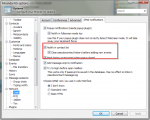 Screen 1 GTalkExt settings
 -
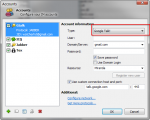 Screen 2 Creating GTalk account

